
Last Updated on July 21, 2026 by Asheesh Kumar
I’m Asheesh Kumar. I run a small library in Dalpatpur, a village near Moradabad, and I tutor students most evenings. A little over a year ago, I got fixated on an idea: build a chatbot that could sit with a student after I’d gone home for the night and help them get past the one doubt stopping them from finishing their homework.
I didn’t know how to code. I still don’t, really. What I had was a library full of CBSE students who kept turning up with the same kinds of questions, and a hunch that AI tools had finally gotten simple enough for someone like me to actually build something with them.
This article is that project, revisited. I’ve kept the original steps because they’re still the right steps to follow — but I’ve rewritten the parts that read like a press release, and updated the tool recommendations for what’s actually true in 2026.
Why I Wanted to Build an Educational AI Chatbot
As a tutor, I’ve noticed that most students don’t struggle because they’re lazy—they struggle because they don’t always get help at the moment they need it.
Sometimes a student has a Maths doubt late at night. Another student gets confused while revising Science before an exam. By the next day, that small doubt often turns into a much bigger learning gap. This isn’t just something I’ve seen in my own classes. It’s a challenge faced by students in many schools and communities around the world.
That’s why I became interested in AI—not as a replacement for teachers, but as a learning assistant that can support students outside the classroom. My vision is simple:
An AI tutor that explains concepts clearly, encourages students to think, and makes learning feel less stressful. I also wanted it to support different education systems over time, starting with CBSE and eventually expanding to other curricula as the project grows.
Of course, building something like this isn’t easy when you don’t come from a technical background. But that’s exactly why I decided to start.
Can Someone Build an AI Chatbot Without Coding?
This was the first question I asked myself. The answer surprised me.
Today, several no-code platforms allow anyone to design chatbot conversations visually using drag-and-drop tools. When combined with modern AI models like ChatGPT, these platforms can create surprisingly capable educational assistants without requiring traditional programming skills. That doesn’t mean the process is effortless.
Even without coding, you still need to understand your users, organize learning content, write clear prompts, test responses, and keep improving the chatbot over time. In other words, you’re replacing programming with planning, experimentation, and continuous learning.
That’s the journey I’m currently on—and in the next sections, I’ll show you exactly how I’m approaching it.
Step-by-Step: How to Build an Educational No-code AI Chatbot Without Coding
Let me walk you through how I’m building this tool — no coding, just clarity and commitment.
Step 1: Deciding What My AI Tutor Should Actually Do
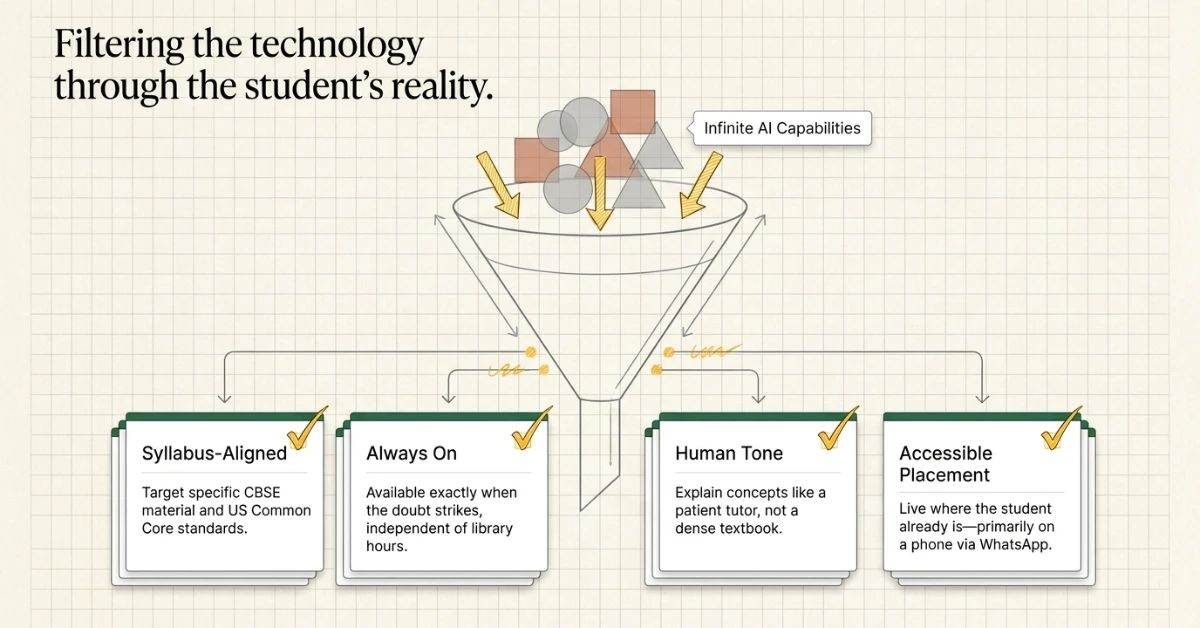
Before touching any tool, I wrote down what I wanted, because it’s easy to get pulled toward whatever a platform can do instead of what your students actually need:
- Answer questions tied to what the student is studying — CBSE syllabus on one side, US grade-level standards on the other
- Be available whenever the doubt comes up, not just during library hours
- Explain things simply, the way I’d explain them in person, not like a textbook
- Live somewhere a student would actually open it — WhatsApp, or embedded on the website
That list became my filter for everything that followed
Step 2: Exploring No-Code AI Chatbot Platforms
Once I knew what I wanted to build, the next challenge was finding the right platform.
Since I don’t have a programming background, writing code wasn’t an option. I needed tools that were beginner-friendly but flexible enough to grow with the project.
Over several weeks, I watched tutorials, compared features, and tested different no-code chatbot builders. Every platform had its own strengths, so instead of looking for the “perfect” tool, I focused on finding one that matched my current needs.
Some of the platforms I explored included:
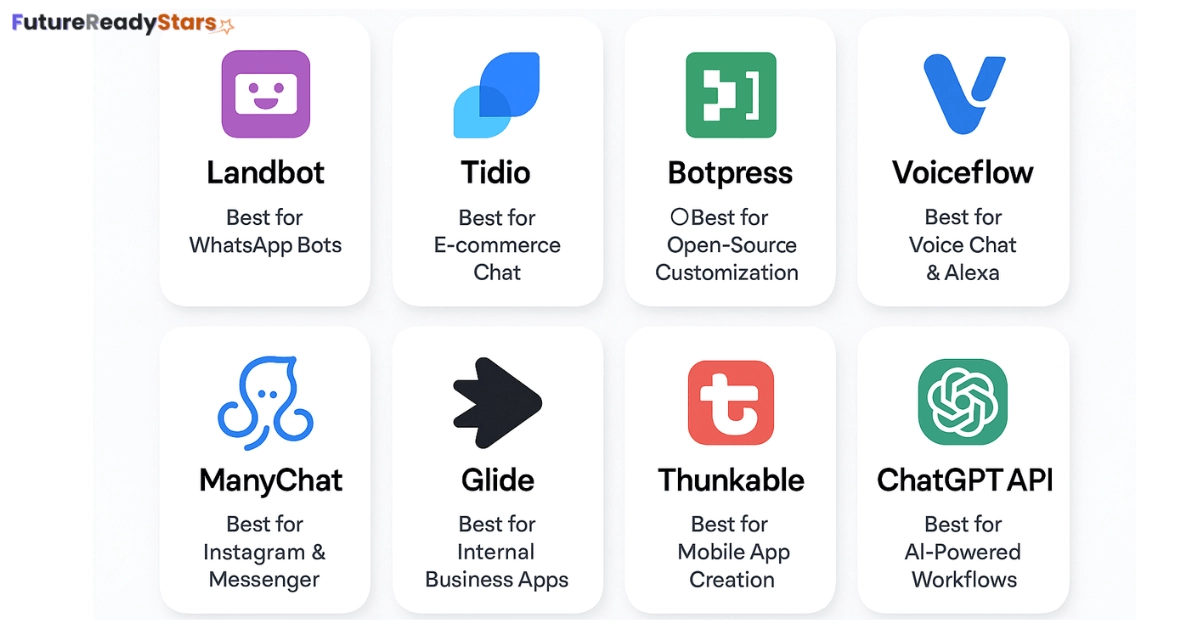
I looked at a lot of no-code builders. Most fall into two types, and the difference matters more than the marketing pages let on.
Flow builders — Landbot, ManyChat — let you draw a conversation by hand: this question, then that button, then this answer. You control every step, but the bot only handles what you scripted for it.
Knowledge-base bots — tools like Botpress or Chatbase — work the other way round. You upload your notes or textbook chapters, and the bot reads them and answers in its own words, including questions you never anticipated. This is closer to what a doubt-solving bot actually needs, and it’s also the part of this market that’s grown the most since I first wrote this piece. (I went deeper into this comparison in Top 20 AI Tools Teachers Need in 2025 for Better Classrooms, if you want the fuller list.)
For a tutoring bot specifically, I’d point a beginner toward the knowledge-base type first now. It suits “explain this chapter to me” far better than a flow builder does.
Landbot for Education
Perfect for beginners. Its drag-and-drop interface makes building a chatbot feel like playing with digital LEGO blocks. Great for creating flows fast — no coding needed.
User-friendly and AI-enabled, it’s ideal if you want something that looks professional and works right out of the box. Bonus: built-in chat automation features.
A bit more advanced, but super powerful. It’s open-source and offers great control if you’re willing to learn the ropes.
Want your chatbot to talk like Alexa? This tool supports both voice and text conversations — perfect for future-ready educational bots.
ManyChat
Best choice if you plan to support students via WhatsApp, Messenger, or Instagram. Very popular among marketers but has strong education potential too.
Step 3: Why I Started with Landbot
I went with Landbot because the free plan let me prototype without spending anything, the drag-and-drop canvas meant I could build without code, and it connected cleanly enough to an AI API for the bot to actually reason instead of just following a script.
That part hasn’t changed — Landbot is still one of the friendlier builders for a first-timer. What has changed is where the company has put its energy: over the past year Landbot has leaned hard into lead-generation and sales use cases, and a lot of its newer features are built for that, not for a bot reading through an NCERT chapter. It still works fine for a scripted Q&A flow. It’s just not the sharpest choice anymore if you want the bot to genuinely understand a syllabus rather than follow a decision tree.
If I were starting from zero today, I’d still prototype the conversation itself in something like Landbot, but I’d route the actual doubt-answering — the part that needs to read the textbook — through a knowledge-base tool instead.
Step 4: Crafting My First Chatbot Flow (Built Without a Single Line of Code)
With the platform selected, it was finally time to build the chatbot itself. Instead of jumping straight into AI prompts, I imagined a real student opening the chatbot for the first time.
What would they see?
What would they ask?
What information would the chatbot need before answering?
These questions helped me design my first conversation flow.
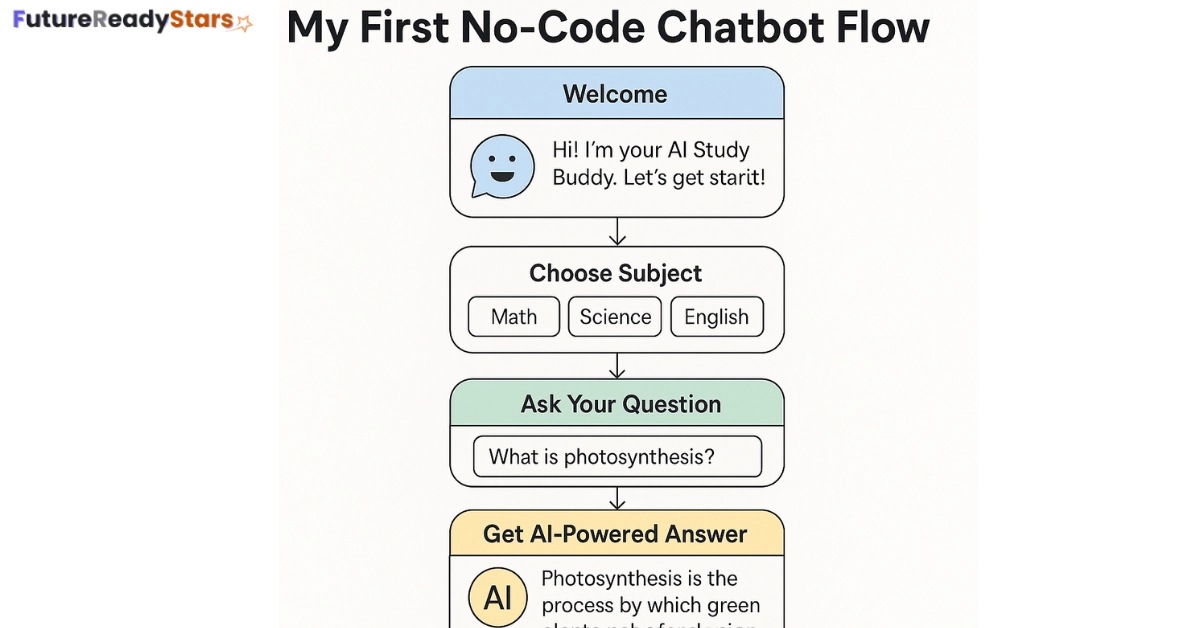
The chatbot begins by greeting the student and asking which subject they need help with. It then collects basic information such as the student’s grade level before allowing them to type their question. Once the question is received, the chatbot sends it to the AI model, which generates an explanation in simple language. The response is then shown back to the student in a conversational format.
The flow itself is quite simple, but building it taught me an important lesson. Creating a useful chatbot isn’t just about connecting AI to a website. It’s about designing conversations that feel clear, helpful, and natural for the people who will actually use it.
Even though I wasn’t writing traditional code, I was learning something equally valuable—how to structure conversations, write better prompts, and think from a student’s perspective.
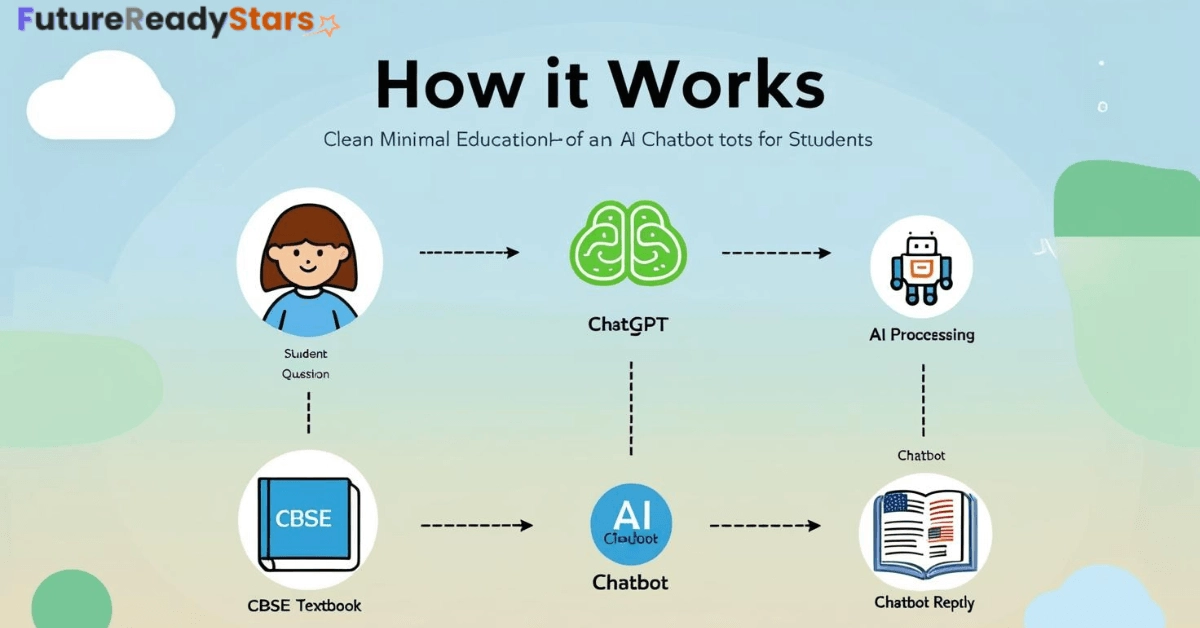
This first flow wasn’t perfect, but it worked — and seeing students smile when they got instant help was worth everything.
Step 5: Building the Chatbot’s Knowledge Base
Once the basic chatbot flow was working, the next challenge was making sure it could give useful and easy-to-understand answers.
I quickly realized that an AI chatbot is only as good as the information and instructions behind it. Simply connecting an AI model isn’t enough—you also need to organize the learning material carefully. For this project, my focus is on educational content that students already study in school.
That includes:
- CBSE and NCERT concepts
- Grade-wise learning material
- Simple explanations for difficult topics
- Real classroom examples
- My own teaching notes and observations
Whenever possible, I rewrite complex textbook language into simpler explanations that students can understand more easily. Instead of trying to make the chatbot sound “smart,” my goal is to make it sound like a patient teacher who explains concepts step by step.
As the project grows, I plan to keep expanding this knowledge base with better examples, frequently asked questions, and more structured learning content.
Step 6: Testing and Improving the Chatbot
The real test wasn’t a demo — it was handing the library’s device to a student and watching what they typed.
What I paid attention to: where they got stuck, whether the answer actually matched their grade level, whether the tone felt like a tutor rather than a chatbot, and which subjects came up that I hadn’t planned for. Every session taught me something, and I kept adjusting the AI’s instructions based on what confused a student versus what actually helped.
I’m also sharing this version with a couple of tutors in the US, so the bot gets tested against Common Core, not just CBSE. That cross-testing is slower, but it’s the only real way to know if the bot generalises, or if it just happens to work for the students sitting in front of me.
Step 7: What scaling this actually looks like
The realistic next steps, in order:
- More subjects, and eventually Hindi as an explanation language, not just English
- Voice replies, for younger students or weaker readers
- A simple mobile wrapper, since a lot of students only have a phone
- Sharing it with other tutors and small coaching centres, not just my own library
I also went back to Top 10 AI Tools That Predict Exam Questions while thinking through this — predictive tools could eventually feed the same bot, flagging what’s worth revising, not just answering doubts as they come in.
None of this needs to happen at once. I’d rather get one grade and two subjects right than half-cover everything.
What’s in my toolkit
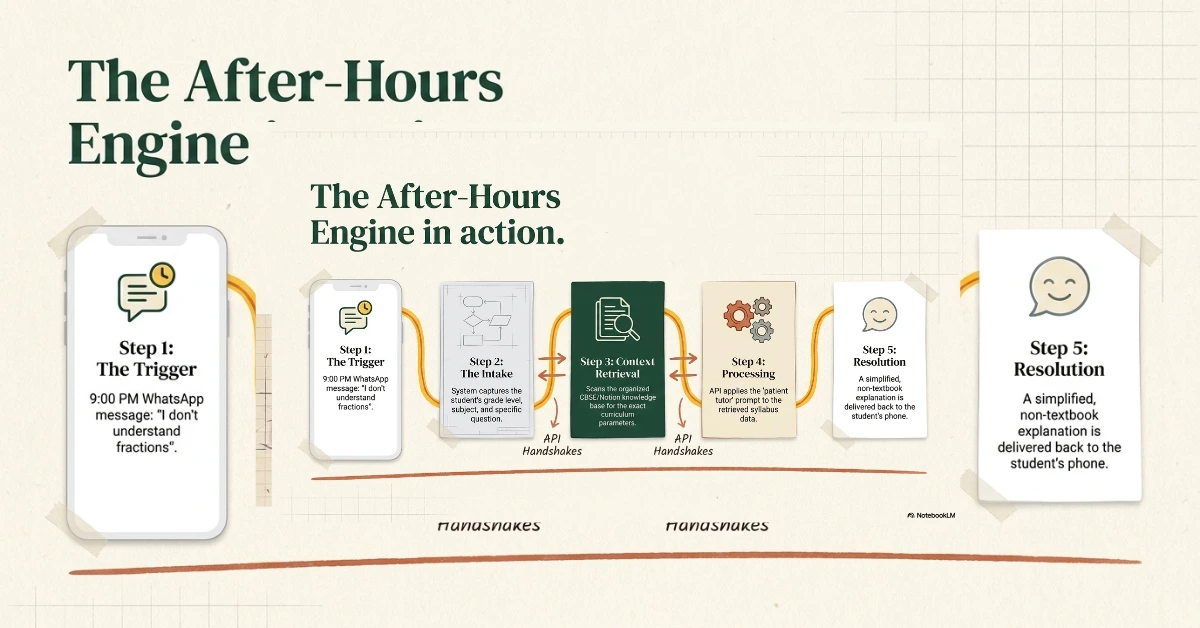
- An AI model via API — OpenAI’s, though Anthropic’s and Google’s are equally reasonable choices now. This is the part that actually reasons through a student’s question.
- A no-code builder — Landbot, or a knowledge-base tool if you’re leaning that way. This is the interface the student actually talks to.
- Notion, to keep the syllabus material organised before it goes into the bot.
- Canva, for mocking up what the chat interface should look like before building it.
I also reviewed several tools from my Top 10 AI Tools That Predict Exam Questions list to explore how predictive AI could personalize learning through the chatbot.
Bonus: My AI Toolkit (Built for Dreamers Like Me)
When I started this journey, I didn’t have a tech background — just a strong desire to help students. These are the tools that made it possible for a non-technical founder like me to bring an educational AI chatbot to life:
✅ ChatGPT API – The Brain Behind My AI Tutor This is the core intelligence. I use OpenAI’s ChatGPT API to generate accurate, helpful responses to student questions. It’s like having a super-smart assistant that never sleeps — available 24/7 for doubt-solving.
Think of it as the “engine” inside the chatbot — I just give it good prompts, and it returns smart answers.
Landbot – My No-Code Chatbot Builder Landbot gave me the power to design conversations visually — like dragging and dropping blocks instead of writing code.
It’s perfect for beginners and lets you create a smart chatbot interface for websites, WhatsApp, or mobile — without hiring a developer.
Notion AI – Organizing Study Material Like a Pro I use Notion AI to convert textbooks and class notes into clean, easy-to-read summaries. Then I plug those summaries into my chatbot’s knowledge base.
It helps me make content more student-friendly — especially for CBSE or K-12 students who need simple explanations.
Canva – Designing a Friendly User Interface With Canva, I mocked up what my chatbot might look like on a phone or laptop. It helps me visualize the experience and make it more engaging for students.
A great-looking interface builds trust — and Canva makes that easy even if you’re not a designer.
YouTube + ChatGPT – My Learning Partners Whenever I get stuck, I turn to YouTube tutorials and ask ChatGPT itself for guidance. From API integration to building logic flows — they’ve been my free online classroom.
No matter your background, if you can search and learn — you can build something big.
Also read: Top 20 ‘No Internet Needed’ AI Tools Bridging the Digital Divide in 2025What I’d tell myself a year ago
You don’t need to be a developer to try this. You need a clear idea of who the student is and what they’re stuck on — the tools have gotten simple enough to handle the rest. I’m not trying to build a startup out of this. I’m trying to make sure a student in Dalpatpur has somewhere to take a doubt at 9 pm, same as a student anywhere else.
If you’re a tutor or educator trying something similar, I’d genuinely like to hear how it’s going — drop a note in the comments, or find me at FutureReadyStars.com
Also read: Top 15 Banned AI Tools Students Love (Why Schools Can’t Stop Them)
My name is Asheesh Kumar i am a dedicated educator and have a deep understanding of artificial intelligence, I aim to transform traditional learning methods by integrating cutting-edge technology and AI-driven tools into education. As a teacher and personal tutor, I have the privilege of working with many students and understanding their individual strengths and weaknesses. With this insight, I know how to help each student overcome their challenges and improve their skills. Understanding each student’s unique learning style and needs allows me to tailor lessons that maximize their potential. This holistic approach not only boosts academic performance but also builds confidence and a lifelong love for learning.
Thanks for sharing. I read many of your blog posts, cool, your blog is very good.
I don’t think the title of your article matches the content lol. Just kidding, mainly because I had some doubts after reading the article.