
Last Updated on January 3, 2026 by Asheesh Kumar
What is ChatGPT Lesson Planning and Why Teachers Love It
“Imagine cutting your lesson planning time from 5 hours to 30 minutes—without sacrificing quality. With ChatGPT, it’s possible. ChatGPT lesson planning is the practice of using artificial intelligence to streamline, enhance, and accelerate the creation of educational content. Instead of spending 20+ hours weekly on planning (as reported by 78% of teachers), educators now complete comprehensive lesson plans in under 2 hours using AI assistance.
Unlike traditional planning methods that rely on static templates, ChatGPT functions as an intelligent teaching partner that understands context, adapts to your classroom needs, and generates personalized content that reflects your students’ unique learning requirements. As a teacher myself, I’ve used AI to streamline my workflow, and in this step-by-step guide, I’ll show you how to use ChatGPT for lesson planning effectively.”
Also Read: Top 20 AI Tools Teachers Need in 2025 for Better ClassroomsThe State of Teaching in 2025: Why AI Integration Matters Now
The Reality Check
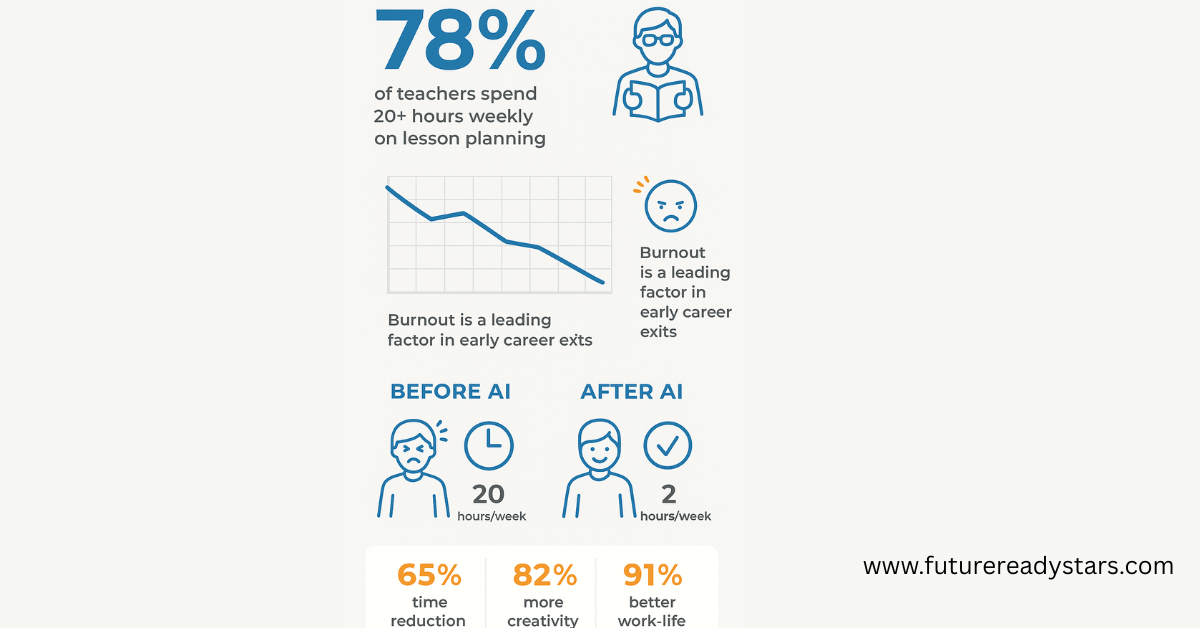
Recent data from the National Education Association reveals a sobering truth: 78% of teachers report spending over 20 hours weekly on lesson planning alone. Meanwhile, teacher retention rates have hit historic lows, with burnout cited as the primary factor in 44% of early career exits.
But here’s where the narrative changes. A groundbreaking 2024 study from MIT’s Teaching Systems Lab found that educators using AI-powered planning tools reported:
- 65% reduction in planning time
- 82% increase in creative lesson activities
- 91% improvement in work-life balance satisfaction
ChatGPT is a game-changer, helping teachers plan lessons faster, design engaging activities, and create quizzes in seconds Whether you’re a K-12 teacher or a college professor, AI can save you hours of work each week, allowing you to focus on what matters most—your students.
Also Read: AI and Teacher Collaboration: Redefining Modern ClassroomsWhy ChatGPT Stands Apart from Traditional Planning Tools
Unlike rigid template generators or one-size-fits-all curriculum packages, ChatGPT functions as an intelligent collaborator that understands context, adapts to your teaching style, and generates personalized content that reflects your classroom’s unique dynamics.
The 3 Biggest Benefits for Teachers
1.Time Liberation: From Marathon Sessions to Sprint Planning
The Traditional Approach: Sarah Martinez, a middle school science teacher in Colorado, used to spend entire weekends planning her upcoming units. “I’d have fifteen browser tabs open, three textbooks spread across my desk, and still feel like I was missing something,” she recalls.
The AI Transformation: Now, Sarah completes her weekly planning in under two hours. “ChatGPT helps me generate the framework, then I add my personal touches. It’s like having a brilliant teaching assistant who never gets tired.”
Data-Driven Impact: According to Stanford’s Graduate School of Education, teachers using generative AI save an average of 8-10 hours weekly—time that can be redirected to student interaction, professional development, or personal well-being.
2.Creative Renaissance: Breaking Through Planning Fatigue
Teaching the same concepts year after year can lead to what researchers call “curriculum calcification”—the gradual loss of innovation in lesson delivery. ChatGPT serves as a creative catalyst, offering fresh perspectives on familiar topics.
Real Classroom Victory: When veteran history teacher Robert Chen felt his Civil War unit growing stale, he prompted ChatGPT for innovative approaches. The result? A mock Twitter debate between historical figures that had students researching primary sources with unprecedented enthusiasm. “I’ve taught this unit for fifteen years,” Chen notes, “but this was the first time students asked if we could extend the lesson.”
3.Differentiation at Scale: Meeting Every Learner Where They Are
Perhaps the most transformative aspect of AI-assisted planning is its ability to help teachers create truly differentiated instruction without multiplying their workload.
The Multiplication Effect: Instead of creating three separate lesson plans for different learning levels, teachers can generate variations instantly:
- Visual learners receive graphic organizer templates
- Kinesthetic learners get movement-based activities
- Advanced students access extension challenges
- Struggling learners receive scaffolded support materials
How to Use ChatGPT for Lesson Planning (Step-by-Step That Actually Works)
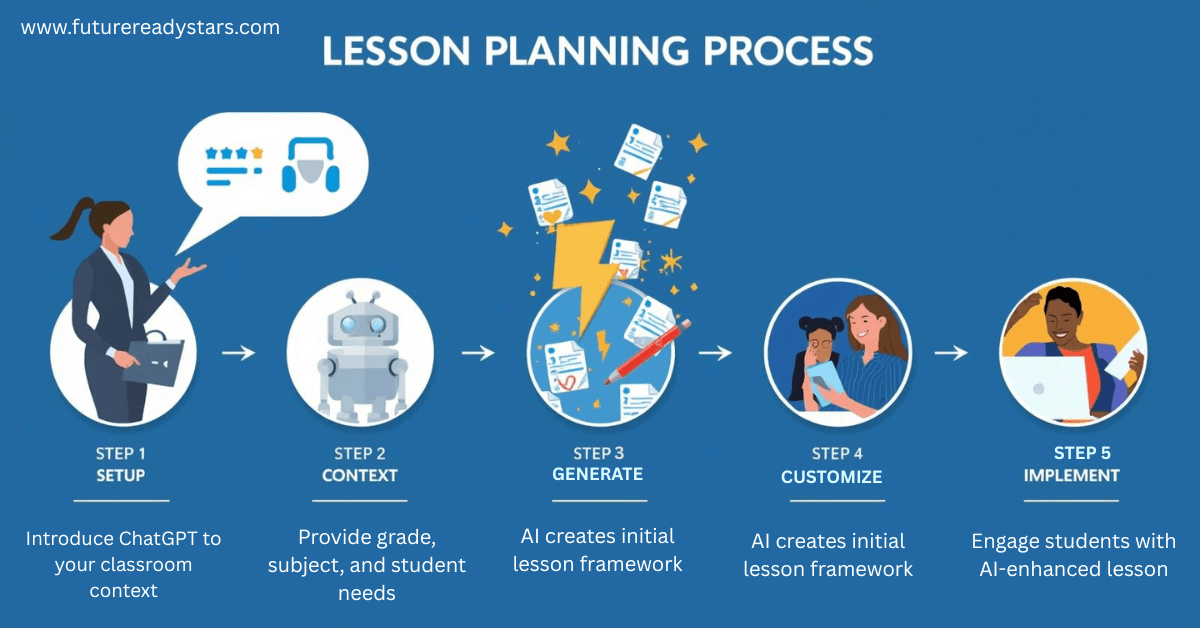
Phase 1: Setting Up Your AI Teaching Assistant
Think of this first step as introducing ChatGPT to your classroom—just like you would brief a substitute teacher. The more context you provide upfront, the better your results will be throughout the year.
Why This Matters: Without context, ChatGPT gives generic advice. With proper setup, it becomes your personalized teaching partner who “knows” your students’ needs.
Foundation Prompt Template:
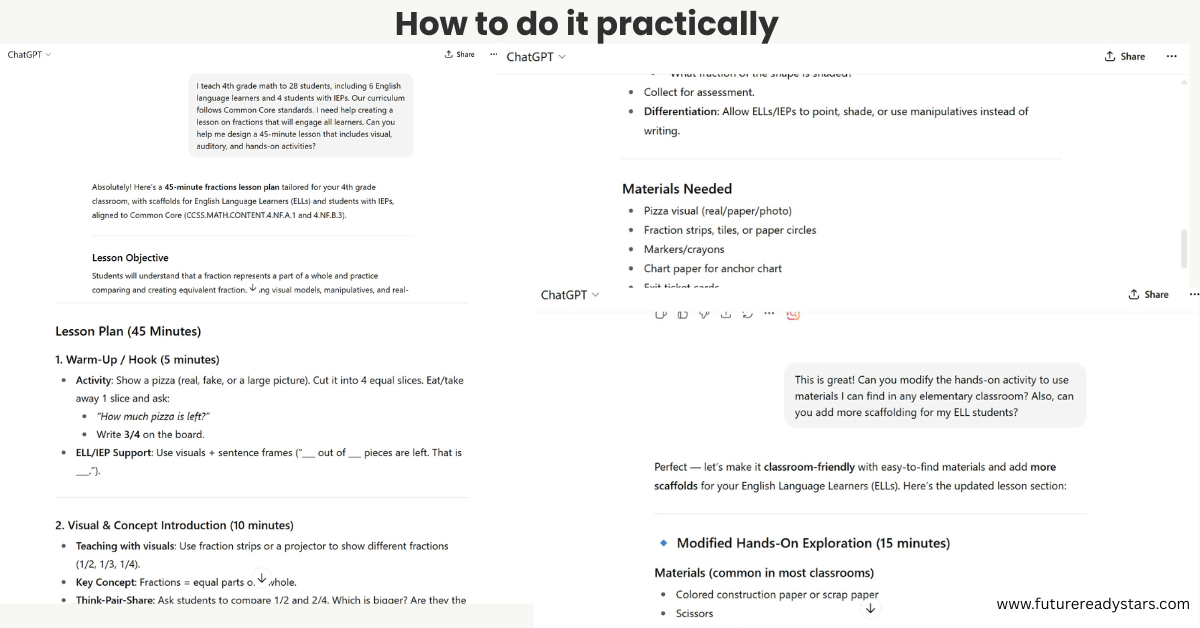
"I teach [grade level] [subject] to [number] students with [specific needs/demographics]. Our curriculum follows [standards]. Help me create engaging, standards-aligned lessons that address diverse learning styles."Real Example in Action: “I teach 4th grade math to 28 students, including 6 English language learners and 4 students with IEPs. Our curriculum follows Common Core standards. Help me create engaging, standards-aligned lessons that address diverse learning styles.”
Pro Tip: Save this context in a document. You’ll use variations of it all year long, and ChatGPT will remember your classroom dynamics within each conversation.
Phase 2: Best ChatGPT Prompts for Elementary Teachers
Elementary teachers juggle everything from basic skills to complex concepts, often within the same lesson. Here’s how to make ChatGPT work smarter for younger learners.
Start with Clear Learning Goals
Kids learn best when they know exactly what they’re supposed to discover. Use this prompt to create crystal-clear objectives that you can actually measure.
Objective Creation Prompt:
"Create 3 measurable learning objectives for teaching [topic] to grade [X] that:
- Align with [specific standard codes]
- Include different cognitive levels
- Address visual, auditory, and kinesthetic learners
- Can be assessed through observable behaviors"
Make Activities Come Alive
Elementary students need hands-on engagement. This prompt ensures you get activities that actually work with real classroom constraints—because who has time to hunt down exotic materials?
Activity Generation Example:
"Design a hands-on science activity about plant life cycles using classroom materials that:
- Takes 30 minutes
- Includes group and individual components
- Connects to students' daily experiences
- Accommodates different reading levels"
Quick Win: Try asking ChatGPT to “gamify” any concept. Elementary students respond amazingly well to learning games, and AI can suggest creative twists on familiar topics.
Phase 3: Advanced ChatGPT Strategies for High School Lesson Plans
High schoolers are preparing for life beyond your classroom walls. They need authentic challenges that mirror real-world complexity—and that’s where ChatGPT really shines.
Think Project-Based, Not Worksheet-Based
Today’s high schoolers have grown up with technology. They crave meaningful work that connects to their future goals. This approach transforms traditional lessons into engaging experiences.
Complex Project Prompt:
"Create a project-based learning experience for [subject] that:
- Spans 2 weeks
- Incorporates current events
- Includes peer collaboration
- Offers multiple demonstration pathways
- Connects to post-graduation skills"
Break Down Subject Silos
The real world doesn’t separate math from science from English. Show students how knowledge connects across disciplines with this integration strategy.
Cross-Curricular Integration:
"How can I authentically combine [primary subject] with [secondary subject] while teaching [concept]? Provide activities that naturally merge both disciplines."Teacher Insight: High schoolers respond well when they see the “why” behind learning. Always ask ChatGPT to include real-world applications and career connections in any lesson suggestion.
Time-Saving AI Lesson Planning Templates for Busy Teachers
Let’s be honest—some days you need a lesson plan in minutes, not hours. These templates are your emergency toolkit for those “unexpected assembly just canceled my prep period” moments.
The 5-Minute Emergency Lesson Framework
We’ve all been there: fire drill disrupted your schedule, a student teacher observation got moved, or technology crashed right before class. This template saves the day.
When to Use: Last-minute schedule changes, substitute teacher needs, or when your original plan just isn’t working.
"I need an engaging 45-minute lesson on [topic] for [grade level] using only basic classroom supplies. Include:
- Opening hook (5 minutes)
- Main activity (25 minutes)
- Closing reflection (10 minutes)
- Extension for early finishers"
Success Story: Maria, a 6th grade teacher, used this prompt when her science lab got double-booked. ChatGPT created a “Kitchen Chemistry” lesson using items from the faculty lounge. Students loved it more than the original lab plan!
Weekly Unit Planning Template
Sunday planning sessions just got shorter. This template creates your entire week’s framework, which you can then customize with your personal teaching style.
"Create a 5-day unit outline for [topic] including:
- Daily objectives that build on each other
- Varied instructional strategies
- Formative assessment checkpoints
- Differentiation suggestions
- Required materials list"
Time-Saving Tip: Use this template at the beginning of each month to get ahead of your planning. You’ll feel so much more prepared and less stressed.
Assessment Design Made Simple
Creating meaningful assessments used to take hours. Now you can design authentic evaluations that actually measure learning—not just memorization.
"Design an authentic assessment for [learning goal] that:
- Reflects real-world applications
- Includes detailed rubric
- Offers choice in demonstration method
- Incorporates self-reflection
- Takes 30 minutes to complete"
Why This Works: Students perform better on assessments when they understand exactly what’s expected and can choose how to demonstrate their knowledge.
How to Create Differentiated Lessons Using ChatGPT
Gone are the days of creating three separate lesson plans for different learners. Modern differentiation means building flexibility into one well-designed lesson that works for everyone.
The Smart Approach: Instead of planning separate lessons, create one lesson with built-in modifications. ChatGPT excels at this kind of adaptive planning.
Universal Design Prompt:
"Modify this lesson for:
- Students reading below grade level
- Advanced learners needing enrichment
- English language learners
- Students with attention challenges
Maintain the same core learning objective."
Real Classroom Application: After creating your main lesson, run it through this differentiation prompt. You’ll get specific modifications that keep all students engaged while working toward the same learning goal.
Multi-Modal Learning Made Easy:
- For Visual Learners:Ask ChatGPT for graphic organizers, mind maps, or infographic ideas aligned with Universal Design for Learning principles
- For Auditory Learners: request discussion protocols, audio elements, or verbal processing activities following research-backed strategies
- For Kinesthetic Learners: Get movement activities, hands-on experiments, or building projects supported by brain-based learning research
Teacher Testimonial: “I used to stress about meeting every learning style. Now ChatGPT gives me three versions of each activity in seconds. My students are more engaged because they can learn their way.” – Jennifer K., 3rd Grade Teacher
Common Mistakes When Using AI for Lesson Planning
Mistake 1: Copy-Paste Without Customization
Problem: Using AI output without adding your teaching voice Solution: Always personalize with student interests, local connections, and your classroom management style
Mistake 2: Vague Prompt Construction
Problem: “Give me a math lesson” produces generic results Solution: Include specific parameters: grade, duration, prior knowledge, available resources
Mistake 3: Over-Automation
Problem: Trying to AI-generate every teaching decision Solution: Reserve AI for time-intensive tasks while maintaining human connection in relationship-building
Mistake 4: Ignoring Accuracy Verification
Problem: Assuming all AI-generated content is factually correct Solution: Always fact-check dates, scientific concepts, and mathematical procedures
Real Teacher Success Stories with ChatGPT Lesson Planning
Sarah Martinez, Colorado Middle School: “I used to spend weekends with fifteen browser tabs open, still feeling unprepared. Now I complete weekly planning in under two hours and have time for what matters—connecting with my students.”
Robert Chen, History Teacher: “When my Civil War unit felt stale, ChatGPT suggested a mock Twitter debate between historical figures. Students researched primary sources with unprecedented enthusiasm.”
Madison County, Montana (District-Wide Implementation): 40% increase in AP participation and 25% improvement in state assessments after teachers adopted AI collaboration strategies.
Ethical AI Use in Education: Teacher Guidelines
Using AI responsibly means modeling digital citizenship for your students. Your approach to AI tools teaches them how to use technology thoughtfully and ethically.
Privacy Protection Essentials
Golden Rule: If you wouldn’t write it on the whiteboard for everyone to see, don’t put it in ChatGPT.
Key Practices:
- Never input student names or personal information per FERPA guidelines
- Use anonymized scenarios (“a student in my class” not “Sarah”)
- Review district AI policies before starting—check CoSN’s AI guidance for schools
- Keep administrators informed about your AI usage
Academic Integrity Standards
Students learn responsible AI use by watching you. Be transparent about when and how you use these tools, following ISTE Standards for Educators on digital citizenship.
Essential Guidelines:
- Model appropriate AI use and explain your process
- Clearly mark AI-assisted vs. original content
- Create classroom AI policies before issues arise
- Teach AI literacy alongside your subject content
Example: “I used ChatGPT for activity ideas, then customized them for how you learn best.”
Equity Considerations
Always ask: “Does this work for ALL my students?”
Equity Checklist:
- Check AI suggestions for bias and diverse perspectives
- Provide alternatives for students without technology access
- Consider the digital divide in assignments
- Request inclusive examples when AI defaults to limited perspectives
Remember: Ethical AI use is about intentionality, not perfection. When you’re thoughtful and transparent, you’re preparing students to be responsible digital citizens.
Also Read: ChatGPT for Students: How to Use AI Ethically in School (2025 Guide)FAQs
Q: Is ChatGPT lesson planning allowed in my school district?
A: Most districts now permit AI tools for teacher planning (not student assessment). Check your specific policy and review the Department of Education’s AI guidance for current federal recommendations. Always maintain transparency with administrators about your AI usage.
Q: How accurate is ChatGPT for subject-specific content?
A: ChatGPT excels at structure and pedagogy but requires fact-checking for specialized content. Always verify scientific concepts, historical dates, and mathematical procedures before implementing.
Q: What if ChatGPT creates inappropriate content for my grade level?
A: Always review and modify AI output. Include age-appropriate specifications in your prompts: “suitable for 3rd graders” or “high school appropriate.” Never use content without your professional review.
Q: Can I share AI-generated lessons with colleagues?
A: Absolutely! Collaboration amplifies AI benefits. Many successful schools create shared prompt libraries and modify lessons collectively.
Free Resource:
Free ChatGPT Lesson Plan Templates
- Elementary School Template (Focus: Interactive activities).
- High School Template (Focus: Critical thinking & analysis).
- ESL Adaptation Template (Focus: Visual aids & simplified language).
Download Here: [Link to templates].
Your Next Steps: Implementing AI Lesson Planning Tomorrow
Week 1 Action Plan:
- Create your foundational context prompt
- Generate one lesson plan using the provided templates
- Compare time spent vs. traditional method
- Join an educator AI community for ongoing support
Essential Resources:
- Save successful prompts in a personal library
- Connect with other AI-using educators through ISTE Connect communities
- Schedule regular evaluation of your AI integration
- Stay updated on new educational AI developments via EdSurge AI coverage
Remember: ChatGPT doesn’t replace your teaching expertise—it amplifies it. You remain the conductor of your classroom orchestra; AI simply helps you create more beautiful music with less preparation stress.
The future of education belongs to teachers who embrace these tools while maintaining the human connections that make learning transformational.
Also Read: AI in Special Education: 10 Best AI Tools for Teachers (2025 Guide)Take Your Teaching to the Next Level with AI!
Want to explore more ways AI can transform your teaching? Visit FutureReadyStars.com for in-depth guides, expert tips, and free resources to help you make the most of AI in education.

My name is Asheesh Kumar i am a dedicated educator and have a deep understanding of artificial intelligence, I aim to transform traditional learning methods by integrating cutting-edge technology and AI-driven tools into education. As a teacher and personal tutor, I have the privilege of working with many students and understanding their individual strengths and weaknesses. With this insight, I know how to help each student overcome their challenges and improve their skills. Understanding each student’s unique learning style and needs allows me to tailor lessons that maximize their potential. This holistic approach not only boosts academic performance but also builds confidence and a lifelong love for learning.
3 thoughts on “How to Use ChatGPT for Lesson Planning: A Teacher’s Complete Guide (2025)”