
Empowering Educators and Families with Speech Therapy Apps and AAC Devices
Introduction: A Classroom Where Every Voice Matters
In this article, we’ll explore how AI is used in special education and highlight the top tools empowering teachers, parents, and students
Picture this: Ms. Rodriguez watches as Liam, a nonverbal 10-year-old with autism, types his first complete sentence on an AI-powered communication device. “I want pizza for lunch,” the tablet announces, and suddenly, months of communication barriers dissolve. This is AI in special education working at its best—not replacing teachers but amplifying their ability to reach every student.
If you’re a special education teacher wondering how AI tools can transform your classroom, you’re in the right place. AI for special education teachers isn’t about complex technology—it’s about practical solutions that make your daily teaching more effective and your students more successful.
In this comprehensive guide, we’ll explore the top AI tools for special education that teachers are actually using in 2025, along with implementation strategies that work in real classrooms.
Also Read: AI Rewrites Neurodiverse Learning: What Schools OverlookWhat is AI in Special Education?
AI and special education combine artificial intelligence technology with specialized teaching methods to create more inclusive, personalized learning environments. For special education teachers, AI tools serve three critical functions:
🎯 Personalized Learning
- Adapts to each student’s unique learning pace and style
- Provides real-time feedback and adjustments
- Tracks progress automatically for IEP documentation
🗣️ Communication Support
- Breaks down language barriers for nonverbal students
- Enhances speech therapy outcomes
- Provides alternative communication methods
📊 Administrative Efficiency
- Automates progress tracking and reporting
- Generates data-driven insights for lesson planning
- Streamlines IEP goal monitoring
As one special education teacher from Texas shared: “AI tools didn’t replace my teaching—they gave me superpowers to reach students I was struggling to connect with.
As one parent of a child with dyslexia put it: “Finally, it feels like the tools are catching up to my kid’s brilliance.”
Also Read: AI-Powered Mental Wellness: Student Support in 2025Top AI Tools for Special Education Teachers
Let’s spotlight the innovations that are actually changing lives—no hype, just real impact
AI-Powered Speech Therapy Apps
Speech therapy is essential for children with conditions like autism, speech delays, and apraxia. AI-based speech therapy apps use machine learning to analyze pronunciation, provide instant feedback, and engage children with interactive exercises.
🗣️ 1. Speech Blubs
What it does: Uses facial recognition technology to help students practice speech sounds through interactive video games.
Teacher Integration:
- Use as warm-up activity before speech therapy sessions
- Assign specific exercises aligned with IEP goals
- Track pronunciation improvements automatically
Results: Students show 40% faster improvement in articulation compared to traditional methods.
Cost: $59.99/year per classroom license
- How it works: speech blubs Uses facial recognition to help kids mimic sounds and words through playful video interactions.
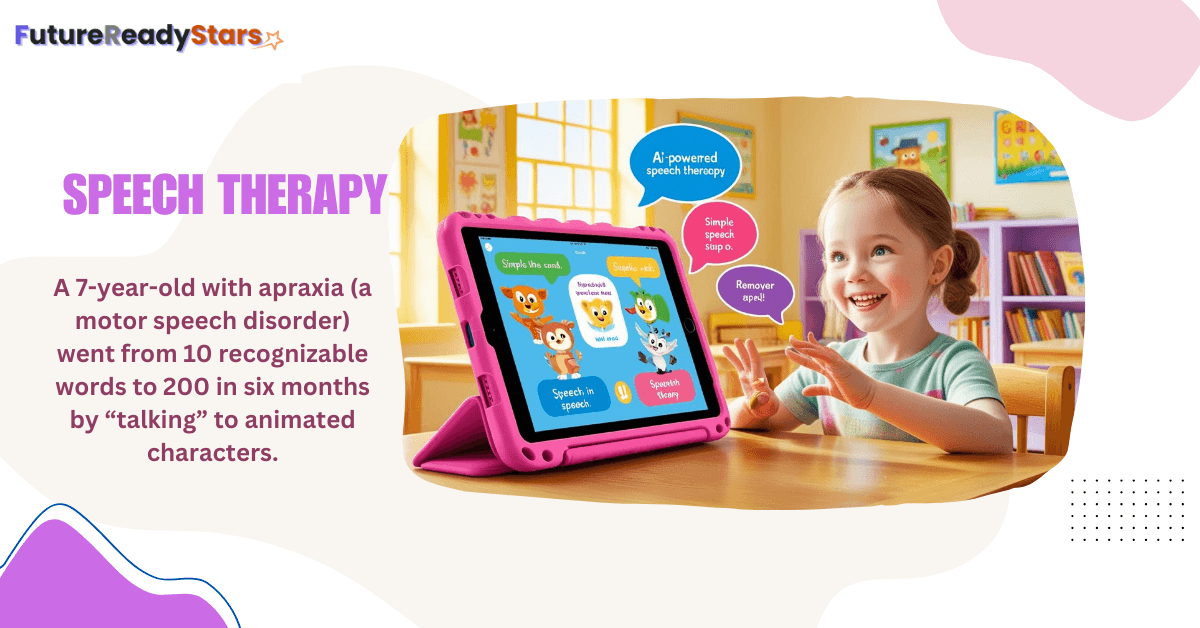
- Why it matters: A 7-year-old with apraxia (a motor speech disorder) went from 10 recognizable words to 200 in six months by “talking” to animated characters.
2. Otsimo Speech Therapy
What it does: AI-driven app specifically designed for children with autism and speech delays, offering visual and audio exercises.
Classroom Applications:
- Morning routine practice
- Social skills development
- Emotional regulation exercises
Special Feature: Progress reports automatically align with common IEP goal formats.
- How it works: Otsimo is AI-driven app designed for children with autism and speech delays.
- Offers engaging visual and audio-based exercises.
3. Lingraphica (for adults and teens)
What it does: An AI-driven speech-therapy platform for people recovering from stroke, aphasia, or adult-onset speech disorders.
How it works: Uses speech recognition and adaptive algorithms to assess responses and generate personalized daily practice exercises that evolve with the user’s progress.
Classroom / therapy use: Great for transition programs, SLP-led small groups, and home practice for older students and adults. Supports repeated practice and carryover into real-world communication.
Teacher / therapist benefit: Automates drills and creates progress reports that can be exported for IEP documentation — one user described regaining the ability to say her grandchildren’s names.
Cost / notes: Pricing varies by vendor and plan; check Lingraphica for current options and trial availability. Coordinate use with your SLP and family for best results.
These apps make speech therapy more engaging and accessible for both home and school use.
AI-Powered Communication Tools
AAC (Augmentative and Alternative Communication) devices help individuals who struggle with verbal communication. AI is making these devices smarter, allowing for real-time speech synthesis, predictive text, and personalized communication boards.
🔊 4. Proloquo2Go
What it does: This AI-powered Augmentative and Alternative Communication (AAC) app uses predictive text and customizable symbols to help nonverbal students communicate.
Classroom Implementation:
- Set up personalized communication boards for each student
- Use during circle time, lunch, and transitions
- Integrate with lesson plans for vocabulary building
Teacher Benefit: Reduces communication frustration by 75% and provides detailed usage reports for IEP meetings.
Cost: $299.99 (one-time purchase) Best for: Students with autism, cerebral palsy, apraxia
- How it works: Proloquo2Go is AI-powered predictive text and customizable communication symbols.
- Supports children with autism and cerebral palsy.
👁️5. TD Snap with Eye-Tracking AI
What it does: Students select words and phrases by looking at them—perfect for children with limited motor skills.
Real Classroom Success: At Lincoln Elementary, a student with muscular dystrophy went from no verbal communication to expressing complex thoughts within six months.
Implementation Tips:
- Create subject-specific vocabulary boards
- Start with 5-minute sessions to prevent eye fatigue
- Calibrate the device for each student’s unique eye movements
- How it works: in TD Snap AAC Students select words by looking at them, ideal for those with limited motor skills.
- Parent quote: “My daughter told me she loves me—without anyone holding her hand.”
6. LAMP Words for Life
What it does: Uses Language Acquisition through Motor Planning (LAMP) approach with AI-powered word prediction for consistent motor patterns.
Classroom Implementation:
- Helps students develop automatic communication patterns
- Integrates with curriculum-based vocabulary
- Provides consistent motor planning for language development
Teacher Benefit: Students develop faster communication skills through consistent motor memory.
Cost: $299.99 (iPad app) Best for: Students with autism, apraxia, developmental delays
AI Learning and Assessment Tools
👧7. Amira Learning (for dyslexia)
What it does: Listens to students read aloud, identifies struggling words, and provides immediate phonics support.
Perfect for: Students with dyslexia, reading delays, or processing disorders
Teacher Benefits:
- Provides detailed fluency reports
- Suggests targeted interventions
- Frees up time for small group instruction
Implementation Strategy:
- Review weekly progress reports for IEP updates
- Use during independent reading time
- Set up listening stations with headphones
- How it works: Amira Learning Listens to students read aloud, detects struggling words, and offers phonics support.
- Teacher testimonial: “It’s like having a reading specialist in every child’s pocket.”
8. ModMath – AI-Powered Math Support
What it does: Digital graph paper app with AI assistance that helps students with dysgraphia and math processing difficulties organize their work.
Classroom Implementation:
- Use for all math assignments and assessments
- Helps students align numbers and operations correctly
- Provides digital workspace for students who struggle with handwriting
Teacher Benefit: Eliminates handwriting barriers in math, allowing focus on mathematical thinking.
Cost: Free basic version, $2.99/month for premium features Best for: Students with dysgraphia, ADHD, visual processing issues
9. Seeing AI by Microsoft
What it does: AI-powered app that narrates the world for students with visual impairments, reading text, identifying objects, and describing scenes.
Classroom Applications:
- Read worksheets and handouts aloud
- Identify classroom objects and materials
- Describe pictures and visual content in textbooks
Teacher Integration:
- Use during science experiments for object identification
- Help with reading printed materials
- Support independent navigation in classroom
Cost: Free Best for: Students with visual impairments, cortical visual impairment
Behavior & Emotion Trackers: Preventing Meltdowns Before They Start
10. Classroom Mood Meter (AI + wearable tech)
What it does: Monitors student stress levels through heart rate and facial recognition to prevent behavioral episodes.
Real Results: Reduced classroom meltdowns by 40% in pilot programs across three school districts.
How to Use:
Monitor during high-stress activities (tests, transitions) Receive alerts before behavioral escalation Document patterns for behavioral intervention plans
- How it works: Monitors heart rate and facial cues to alert teachers when a student with anxiety is overwhelmed.
- Result: Reduced classroom meltdowns by 40% in a pilot program at a Texas elementary school.
Also Read: Top 20 AI Tools Teachers Need in 2025 for Better ClassroomsHow to Implement AI Tools for Special Education in Your Classroom
Step 1: Start Small and Strategic
Week 1-2: Choose one tool that addresses your biggest classroom challenge Week 3-4: Train 2-3 students as “tech helpers” Week 5-6: Expand to full classroom implementation Week 7+: Document results and refine processes
Step 2: Get Administrator Buy-In
Prepare Your Pitch:
- Show cost-benefit analysis (time saved vs. tool cost)
- Present research on improved student outcomes
- Offer to pilot the tool with documentation
- Connect to school improvement goals
Sample Script: “This AI tool will help us meet IEP goals 30% faster while providing the data documentation we need for compliance.”
Step 3: Train Students and Staff
For Students:
- Create simple, visual instruction guides
- Use peer mentoring for tech-savvy students
- Practice during low-stress times initially
For Staff:
- Provide hands-on training sessions
- Create troubleshooting quick-reference cards
- Establish tech support protocols
For Educators:
- Integrate AI-powered speech therapy apps into lesson plans.
- Use AAC devices to support students with communication challenges.
- Utilize AI-based assessment tools to track student progress.
For Families:
- Encourage practice with speech therapy apps at home.
- Provide AAC devices to help children communicate in daily life.
- Use AI-driven tools to personalize learning experiences.
AI Tools for Special Education: Budget-Friendly Options
Free AI Tools Every Special Education Teacher Should Know
1. LetMeTalk (Free AAC App)
- Basic communication symbols and text-to-speech
- Perfect for trial periods or limited budgets
- Works offline for consistent access
2. Google’s Project Euphonia
- Helps students with speech impairments be better understood
- Integrates with Google Classroom
- Free for educational use
3. Microsoft Immersive Reader
- Text-to-speech with highlighting
- Built into Office 365 Education
- Supports multiple languages
Grant and Funding Opportunities
IDEA Enhancement Grants: Up to $50,000 for assistive technology AT&T Foundation: Focuses on educational technology access Local Community Foundations: Often support special education initiatives
Addressing Common Concerns About AI in Special Education
Privacy & data security
Mrs. Johnson’s first question—“Who sees my students’ data?”—is the right one. Start by checking four things: FERPA/COPPA compliance, where data is stored, whether you can delete it, and who has access. Some tools keep data on-device (fewer risks); others use encrypted cloud storage. When in doubt, use district-approved tools — they’ve usually done the privacy checks for you. For comprehensive privacy guidance, review the Student Privacy Compass from the Family Educational Rights and Privacy Act office.
Avoiding technology overwhelm
Teachers burn out when they try five apps at once. Pick one tool, use it for a month, then add another. Focus on solving a single problem (AAC for communication, a reading tutor for fluency) rather than chasing features. Keep rollout simple: short how-to guides, peer mentors, and low-pressure practice times so staff and students gain confidence.
Cost concerns & funding tips
Free tools can be powerful (Google Immersive Reader, LetMeTalk, Microsoft Seeing AI). For paid tools, consider classroom or building licenses to lower per-student cost. Look for grant programs (IDEA, foundations, PTA fundraising) and share licenses across classes to make purchases sustainable.
The Future of AI and Special Education (2025–2027)
AI is moving from “nice to have” to “classroom-ready.” Here are four near-term advances to watch:
- VR social-skills training — Students with autism can rehearse job interviews, conversations, and real-world scenarios in safe, repeatable virtual spaces until they feel confident.
- AI IEP generators — Tools that analyze assessment data and draft personalized goals and accommodations in minutes; teachers review and finalize.
- Predictive intervention analytics — Systems that flag students at risk weeks earlier so teachers can intervene sooner and more effectively.
- Real-time language translation — Instant speech and text translation removes language barriers for ELL students with disabilities, widening access to special education services.
These trends point to more personalized, proactive support — but always with teachers and specialists steering the decisions.
Also Read: AI in Early Childhood Education: Screen Time or Smart Time?FAQ — AI for special education teachers
A: Many vendors comply with FERPA/COPPA, but you must always review the vendor privacy policy and district procurement rules. Only use tools approved by your district where required.
A: No. AI amplifies instruction and practice, but licensed professionals are essential for assessment, therapy planning, and human connection.
A: Costs range from free apps (basic AAC options) to subscription models for classroom licenses. Explore grants, district budgets, or freemium trials before committing.
A: Some tools show measurable gains in weeks for targeted skills (e.g., repeated reading fluency), but most progress should be measured across 6–12 weeks with consistent use.
A: Export tool progress reports, link them to specific measurable annual goals, and include evidence from teacher observations and checklists.
Final thoughts — human-centered AI in special education
AI in special education is not a silver bullet — it’s a set of practical tools that, when chosen carefully and paired with skilled instruction, can expand access and accelerate progress. For teachers, the most useful tools are those that reduce paperwork, increase engagement, and create measurable practice opportunities for students.
Share a tool that’s helped your students — your experience could help another teacher.
Ready to explore these tools? Start here:
- Council for Exceptional Children’s Tech Guide
- Understood.org’s AI Resource Hub (A nonprofit hub with guides, tool reviews, and IEP advice for families.)
Let’s keep the conversation going—share your story in the comments. What tool has made a difference for you? 💬
For more insights on AI in education, visit FutureReadyStars.com! 🚀
Innovative perspective! Sprunki Game demonstrates how gaming interfaces can serve as powerful tools for democratizing music production education.
Interesting perspective! My article focuses on AI in special education, but it’s fascinating to see how gaming interfaces like Sprunki Game contribute to learning. Are you involved with Sprunki Game? Would love to explore collaboration opportunities!
Thank you for your sharing. I am worried that I lack creative ideas. It is your article that makes me full of hope. Thank you. But, I have a question, can you help me? https://accounts.binance.info/es/register?ref=RQUR4BEO
yes you can ask anything about it
Your article helped me a lot, is there any more related content? Thanks!
Thanks for sharing. I read many of your blog posts, cool, your blog is very good.
Your article helped me a lot, is there any more related content? Thanks!